
Technical guide · Video generation with MiniMax-H3
MiniMax H3From a prompt to a video with sound
Deploy MiniMax-H3 on QDivZero and generate videos from text. A step-by-step guide with examples, Python code and measured generation costs.

Guide contents5 sections
A teapot on a table, steam rising from a cup and a camera moving slowly closer. We will ask MiniMax-H3 for that scene, download the video and change the scene to generate a second example. First in QDivZero, then from Python.
The model runs on your deployment's GPU. Your computer sends the prompt and receives an MP4 with video and audio. You do not need to install the model or have a local graphics card.
Before reserving a GPU, review the MiniMax-H3 license. Its public license excludes the European Union, the United Kingdom, South Korea and the United States; use in these territories requires separate authorization from MiniMax. Hosting the model on QDivZero does not remove that condition.
1. Deploy MiniMax-H3
You need a QDivZero account with credit. The Python examples also need an API key and your account ID; you can leave those until step 3.
- Open Deployments and click Deploy model.
- Choose the manual picker and search for
MiniMaxAI/MiniMax-H3. Select the official repository, labeled Video. - Continue to Pod. Smart scheduling finds compatible capacity and prepares the runtime the model needs.
- Select a region allowed for your deployment. If you choose a specific region, clear No region to restrict the selection.
- Set a Maximum price per hour. This caps the GPU offer; total spending also depends on how long the instance runs.
- For this first session, disable interruptible capacity. A video can take several minutes to generate, and a Spot interruption may mean repeating the request.
- Under Scheduling, add a Stop rule for when you expect to finish. Check the time zone beside the cron expression.
- Under Configuration, enter a recognizable deployment name, such as
MiniMax H3 · video guide. Leave Serverless and Replica set disabled during this test. - Under Review, use
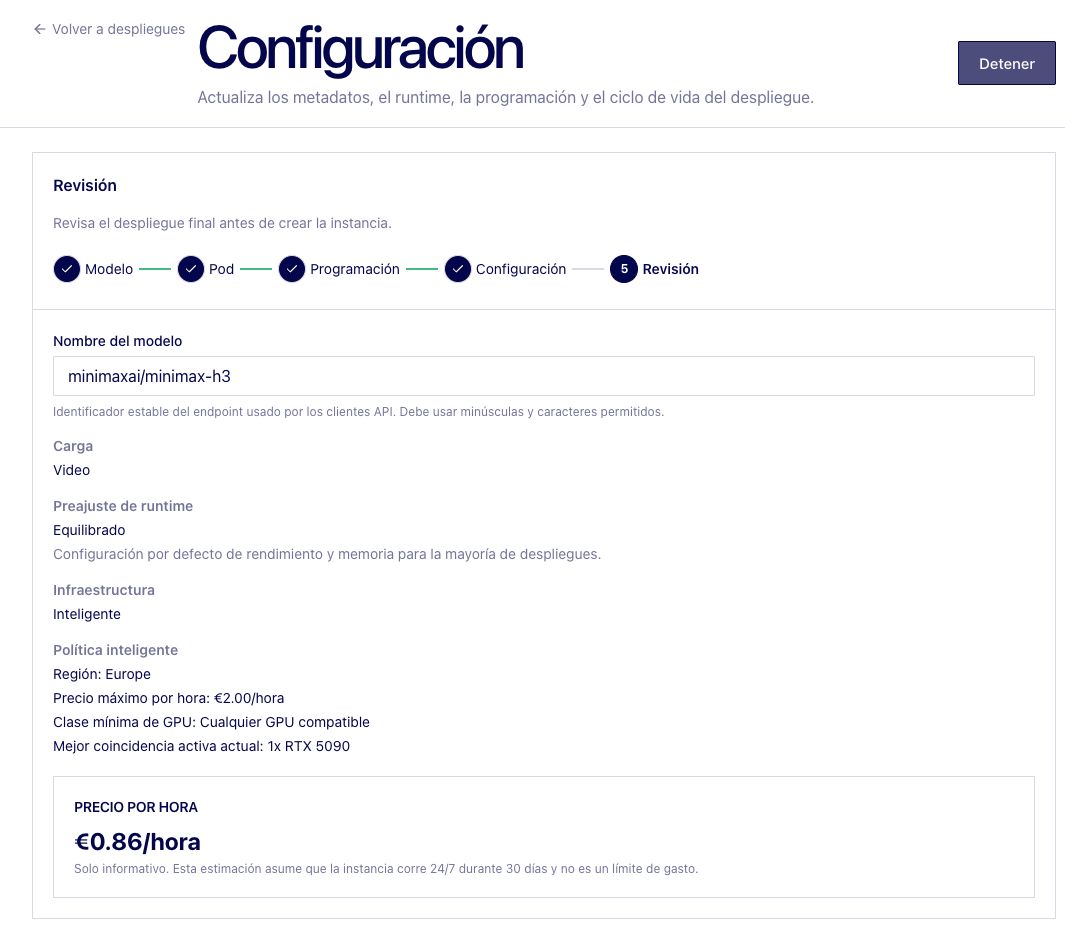
minimaxai/minimax-h3as the Model name. This is the endpoint identifier for both the workbench and the API. - Click Deploy model. Once it appears in the list, open its row and choose Model status → Start model. Wait for startup to finish.
Creating the deployment and starting the model are separate steps. Not started means the second step is still needed. Pending means the server is being prepared.
The wizard's price is an estimate based on capacity available at that moment. With Smart scheduling, it can change between the preview and startup. Record the price of the instance that actually starts.
2. Generate a video from text
Open Developers, select Generate video under Task, and choose minimaxai/minimax-h3 under Model. Leave T2VA selected as the generation task. This means text to video and audio; this example needs no attachments.
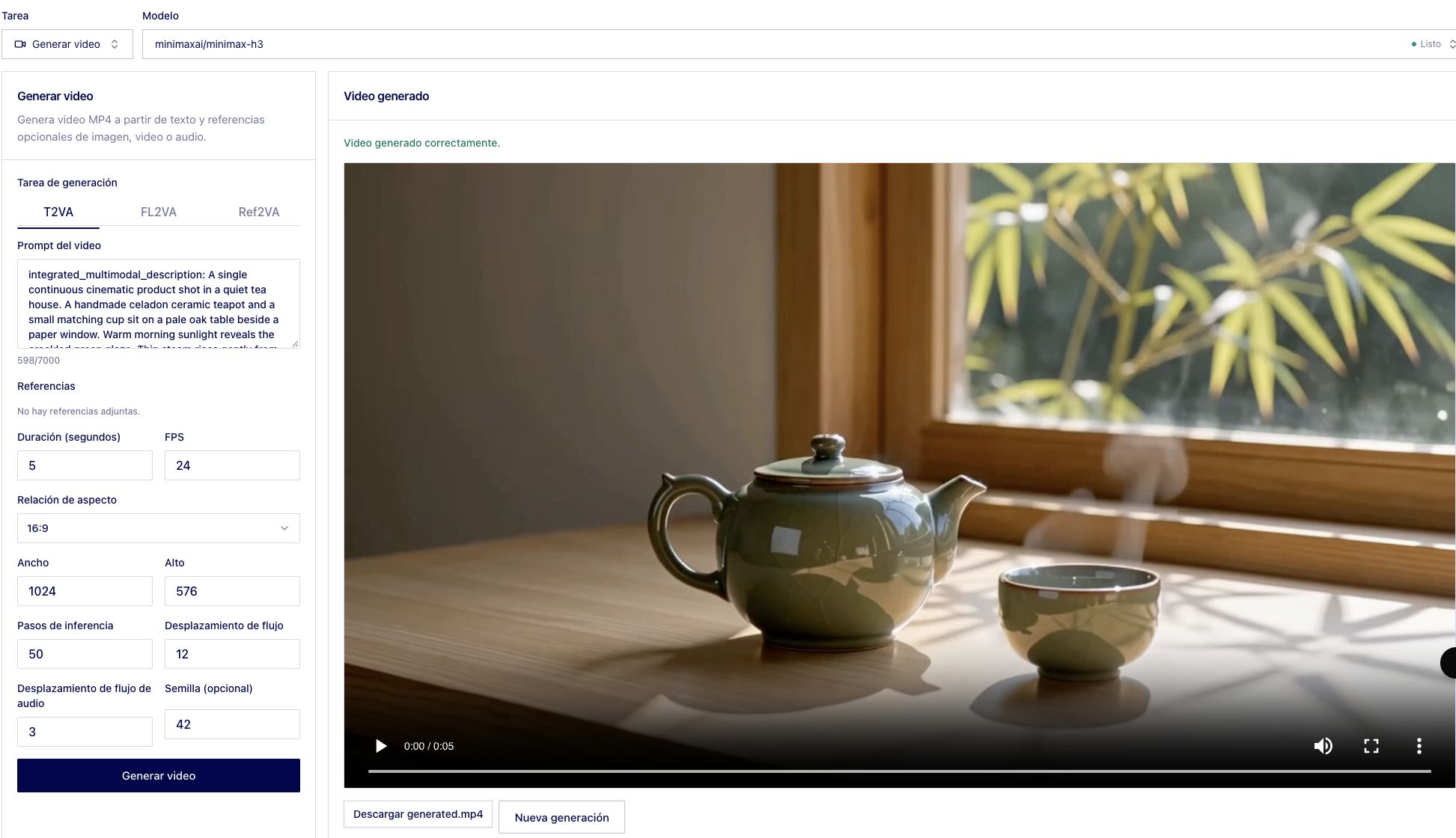
Paste this text into the video prompt field.
1integrated_multimodal_description: A single continuous cinematic product shot in a quiet tea house. A handmade celadon ceramic teapot and a small matching cup sit on a pale oak table beside a paper window. Warm morning sunlight reveals the crackled green glaze. Thin steam rises gently from the cup throughout the five-second shot. The camera slowly pushes closer, keeping the teapot shape stable and the cup in frame. No cuts, no people, no lettering, no logos.
2overall_soundscape: Quiet indoor ambience and a faint breeze moving the bamboo outside the window. No speech.
3non_diegetic_music: None.
4
The prompt describes the scene, camera movement and sound. Those three field names are part of the text sent to the model, not extra API parameters. We follow the structure in MiniMax's prompting guidance to describe the visuals and sound separately.
Use these settings in the workbench.
Click Generate video once. The panel shows elapsed time while it waits for the response. Once it finishes, play the whole result, listen to the audio and save the MP4 before sending another prompt.
The five seconds in the form describe the length of the resulting video. Generation time is a separate measurement: it depends on the GPU, dimensions, steps and server state.
Our first request took about seven minutes on one RTX 5090. At €0.79/hour, that is approximately €0.09 of compute during the request. Below, we will add startup and idle time to calculate the session cost.
Change one thing at a time
The second example uses water, bamboo and a boat. The camera stays still; the boat, leaves and river provide the movement. The full prompt is in prompts.json under river.
1integrated_multimodal_description: A single continuous wide shot of a small wooden boat drifting slowly from left to right on a calm river in southern China. Rounded limestone mountains fade into morning mist. Green bamboo leaves in the near foreground sway softly in the breeze, and gentle ripples spread behind the boat. The camera remains still for the entire five-second shot. Natural cinematic light, restrained jade green and warm ivory colors, no cuts, no people visible, no text, no logos.
2overall_soundscape: Gentle water lapping, rustling bamboo leaves and distant birds. No speech.
3non_diegetic_music: None.
4The model added a person to the boat even though we asked for nobody to be visible. If that matters for your piece, adjust the prompt or generate another version. A successful request does not guarantee that the video follows every instruction.
For your own clips, start with one scene and one action. A slow camera push is easier to evaluate than a sequence with several cuts and characters. Keep the seed and settings while changing the prompt, and save every version for comparison.
The seed helps repeat an experiment within the same environment. It does not guarantee identical files across different GPUs, runtimes or model versions.
3. Save the MP4 from Python
Download generate_video.py and prompts.json into the same directory. The script uses Python 3.11 or later and needs no additional packages.
Set your API key and account ID. The latter appears as X-Account-Id under Developers → View code.
1export QDIV0_API_KEY='YOUR_API_KEY'
2export QDIV0_ACCOUNT_ID='YOUR_ACCOUNT_ID'
3
4python3 generate_video.py \
5  --model minimaxai/minimax-h3 \
6  --example tea \
7  --output results/tea.mp4
8
The command saves tea.mp4 and tea.json. The JSON contains the prompt, settings and request duration, without credentials. For the river scene, switch to --example river and choose a new output filename.
If the video or its metadata already exists, the script stops before sending another request. Choose a different filename for each result.
What QDivZero receives
The endpoint is POST https://api.qdiv0.com/v1/videos. It takes multipart/form-data, including for text-only requests. These are the main fields in the first example.
1model=minimaxai/minimax-h3
2task=t2va
3prompt=The full scene description
4duration=5
5width=1024
6height=576
7aspect_ratio=16:9
8num_inference_steps=50
9flow_shift=12
10audio_flow_shift=3
11seed=42
12
The key goes in Authorization: Bearer … and the account in X-Account-Id. A successful response contains the MP4 bytes, written directly to disk; there is no job ID to poll afterwards.
The connection remains open while the model generates the video. If your application has a short timeout, a request can fail while the GPU is still working. The example does not retry automatically: inspect the deployment before sending it again.
4. Measure the time and stop the GPU
These are our tests from 19 October 2026 with one RTX 5090 at €0.79/hour, without Spot. Both requested five seconds at 1024 × 576, 24 fps, 50 steps and seed 42.
The tests ran with one request at a time. We requested five seconds and received MP4s of approximately 5.17 seconds, retaining their original audio. Download the settings and timing intervals. The time includes server waiting and transfer to the workbench.
When you use the Python script, its JSON records request_seconds, from sending the request until the video has downloaded. This includes waiting and transfer. Use your instance's actual hourly rate to estimate the compute cost of a generation.
1Estimated generation cost = hourly rate × request seconds ÷ 3,600
2Average session cost = total billed compute cost ÷ videos obtained
3
The first calculation approximates compute at the displayed rate; it does not replace billed usage. The second includes startup and pauses between attempts. If you start a GPU for a single clip, those minutes may cost more than the generation itself. Record failed requests too: they may have used compute even if no file was returned.
About 63 minutes passed from requesting startup until we confirmed the instance had stopped, including pauses to prepare this guide. Charging that whole window at €0.79/hour gives a conservative estimate of €0.83 for the session, or about €0.42 per downloaded video. That is an estimate from elapsed time, not a billing statement. Running several clips consecutively spreads the startup cost across more results.
When finished, return to Deployments, open the MiniMax-H3 row and choose Model status → Stop model. Wait until it shows Stopped. Closing the browser or finishing the script does not stop the GPU.
For future sessions you can use a Scheduling rule. Serverless can also start the model on demand and stop it after a period without traffic; enabling it removes existing scheduling rules. On-demand startup still needs time to prepare the model.
If something goes wrong
The official MiniMax-H3 model card describes a wider system with context preparation and 2K regeneration. This guide uses the model deployed on QDivZero and the workbench's sizes; those additional MiniMax services are outside these examples.