
Technical guide · Deploying DeepSeek for teams
DeepSeek V4.1 Flash 1017Your whole team · 32 concurrent users
Deploy DeepSeek V4.1 Flash 1017 on QDivZero and connect it to OpenCode. A walkthrough for 32 concurrent users, with an interactive cost calculator.

Guide contents8 sections
We will deploy DeepSeek V4.1 Flash 1017 on QDivZero and connect OpenCode to work on a repository. The whole team will use one private endpoint, each person with their own API key. The model supports up to 1M tokens of context.
Our reference is a deployment for 32 concurrent users, priced at €5/hour on demand for the whole deployment. A team of more than 32 people can share it if usage is spread across the day. Capacity depends on the GPUs, context length and work you ask the model to do.
Eight hours a day over 22 working days costs €880/month in compute. That is €27.50 per person per month for 32 members, or €13.75 for 64. Step 6 has a calculator for your own figures and instructions for scheduling start and stop times. The final steps cover Serverless and the balancer for teams working outside a fixed schedule.
1. Prepare your account and API key
You need a QDivZero account with balance to start the GPUs and an API key for that account. We will use the key from the terminal, so keep it out of the repository.
Have cURL, Python 3.11 or later and OpenCode installed on the computer or server where you work on your project. We will use cURL for the first request and Python for the load test.
DeepSeek runs on QDivZero's GPUs. OpenCode runs on your computer or server, where it reads project files, calls the model and runs the tools you authorize.
The examples call the model equipo-codigo. You can choose another name if you also change it in the requests and OpenCode configuration.
2. Deploy DeepSeek V4.1 Flash 1017
- Open Deployments → Launch a model and choose the manual catalog.
- Search for
deepseek-ai/DeepSeek-V4.1-Flash-1017, select it and continue to the Pod step. - Choose the Deep profile for analysis and long-context work. To follow the example with the full window, the server context needs to be
1048576tokens. If Deep proposes a smaller window, use Custom → Require full model context. QDivZero will calculate the memory and GPU count needed. - Enable Scheduling mode → Smart to find capacity compatible with the model.
- Under Region, select only Europe. Uncheck No region and the other regions.
- Disable Allow community capacity. For this first on-demand test, also leave Allow interruptible capacity disabled.
- Set the Maximum hourly price you accept. Review the offer's GPU, memory, provider, location and price for the whole deployment.
- Under Configuration, name the deployment
equipo-codigo. Leave Serverless and Replica set disabled so the first test uses a running instance. - Under Review, also enter
equipo-codigoin Model name. This field is the API identifier, even if the deployment's display name is different. - Confirm the deployment and wait for the model to finish loading.
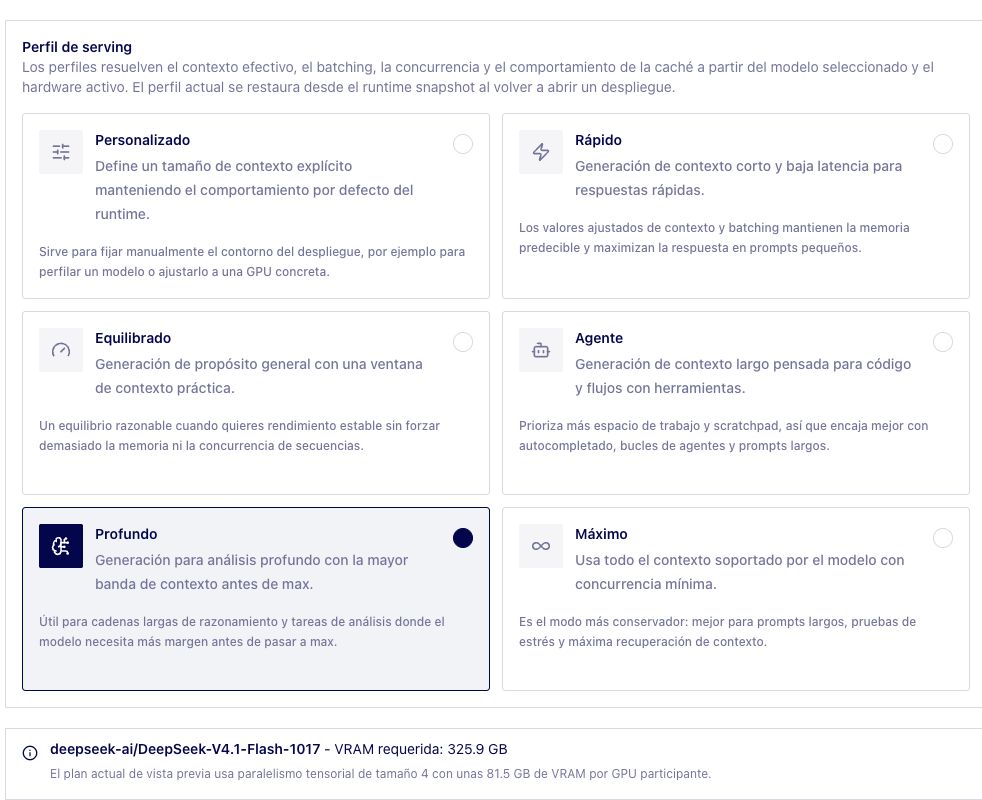
Even when the model spans several GPUs, the whole team uses one endpoint. QDivZero prepares the inference server, distributes the model and configures DeepSeek's tool calls. The weights are shared in memory, and each person keeps their conversation in their own client.
The model card lists the MIT license and a 1M-token window (1,048,576). The OpenCode examples use that window for code, documentation and tool history. Long conversations consume more memory, especially when several run at once. Requiring the full context may change the offer you need; use the price shown in the wizard to calculate your cost.
Keep the deployment in Europe
QDivZero's platform infrastructure is in Europe. The Europe filter also limits the location of the GPUs running your model and stays in place when the scheduler looks for capacity to restart it.
We will use Chat Completions. QDivZero does not retain logs of those calls' content or use your prompts or submitted code to train models. Usage, billing and security records are handled according to the privacy policy. OpenCode keeps its history according to its own configuration.
If you want to try a spot instance
With Allow interruptible capacity enabled, the scheduler also searches spot offers. It may still select on-demand capacity, so the selection summary shows which type was chosen.
The provider can reclaim a spot machine. QDivZero tries to relaunch it, but finding capacity and loading the model takes time. During that gap, you need to wait or have another destination available. Step 8 explains how to add that fallback.
3. Send your first request to DeepSeek
Open a terminal and paste this block with your key in place of TU_CLAVE_API_DE_CUENTA. The sample prompt asks for a Python function and two assertions.
1export QDIV0_API_URL='https://api.qdiv0.com'
2export QDIV0_API_KEY='TU_CLAVE_API_DE_CUENTA'
3export QDIV0_MODEL='equipo-codigo'
4
5curl --fail-with-body --silent --show-error --max-time 900 \
6  "${QDIV0_API_URL}/v1/chat/completions" \
7  -H "Authorization: Bearer ${QDIV0_API_KEY}" \
8  -H 'Content-Type: application/json' \
9  --data-binary @- <<JSON
10{
11  "model": "${QDIV0_MODEL}",
12  "messages": [
13    {"role": "user", "content": "Escribe una funcion Python add(a, b) y dos asserts. Sin explicacion."}
14  ],
15  "max_tokens": 4096,
16  "stream": false
17}
18JSON
19
The response arrives as JSON. Inside choices[0].message you will find the assistant's message with the function and two assert statements you asked for.
If it fails, start with the instance status and the account the key belongs to. Model name needs to be equipo-codigo, as in the request. A response with finish_reason: "length" means the output limit was reached, which may include reasoning. In that case, increase max_tokens within the server's supported limits.
4. Connect DeepSeek to OpenCode
Create an opencode.json file in the project root with this content. If you already have one, merge this configuration into the existing file.
1{
2  "$schema": "https://opencode.ai/config.json",
3  "model": "qdivzero/equipo-codigo",
4  "enabled_providers": ["qdivzero"],
5  "provider": {
6    "qdivzero": {
7      "npm": "@ai-sdk/openai-compatible",
8      "name": "QDivZero",
9      "options": {
10        "baseURL": "https://api.qdiv0.com/v1",
11        "apiKey": "{env:QDIV0_API_KEY}"
12      },
13      "models": {
14        "equipo-codigo": {
15          "name": "DeepSeek V4.1 Flash 1017",
16          "limit": { "context": 1048576, "output": 4096 }
17        }
18      }
19    }
20  }
21}
22
Download opencode.json · Download the Python probe · Example instructions
OpenCode reads the key from QDIV0_API_KEY through {env:QDIV0_API_KEY}. You can share this JSON with the team because it only contains the URL, model name and limits.
The context field declares the 1M-token window, while output limits each response to 4,096 tokens in this example. Context includes input and output, so part of that window is reserved for the response. The QDivZero deployment needs to have the same context enabled. OpenCode documents other options under custom providers and environment variables.
Return to the terminal from the previous step, enter your project root and start OpenCode.
1opencode
2
Open /models and select DeepSeek V4.1 Flash 1017 under QDivZero. You could start with “Read this function, explain why it fails and propose a change with a test.” You will see which files it reads and which changes it proposes. Review the diff and run the test before keeping the change. OpenCode works on the machine where you installed it, with the permissions you gave it.
5. Give the team access and test the load
People sharing this deployment need access to the same QDivZero account. Each person will use their own revocable API key.
Share opencode.json with the team. Each person sets their own QDIV0_API_KEY and opens OpenCode from their project. Everyone uses equipo-codigo and keeps their agent's history and tools in their own client.
Before bringing in the whole team, you can send concurrent requests with probe_endpoint.py. Download it and open a terminal in the folder where you saved it, with the variables from step 3. Start with one request, wait for the result and continue with four. If that goes well, move to 32.
1python3 probe_endpoint.py --requests 1 --concurrency 1
2python3 probe_endpoint.py --requests 4 --concurrency 4
3python3 probe_endpoint.py --requests 32 --concurrency 32
4
The script reports times, errors and tokens when the server returns them, without printing response content. Use --max-tokens 4096 for more output headroom. The --tools option asks DeepSeek for a call to a test tool and reports whether it returns one, without executing it.
These short requests give you an initial connection and waiting-time test. To see how it will behave during the working day, you also need repository tasks with contexts similar to your team's. That will show you how long responses take and whether errors appear as the load grows.
If you need more sustained capacity, Replica set maintains the number of instances you configure with smart scheduling. Each replica adds its cost. This option does not combine with Serverless or increase the replica count automatically with load.
6. Set the schedule and calculate the cost
If you work nine to five, you can keep the GPUs on during those hours. Under Configuration, leave Serverless disabled and open Scheduling. These two rules start and stop the deployment on weekdays in the Europe/Madrid time zone.
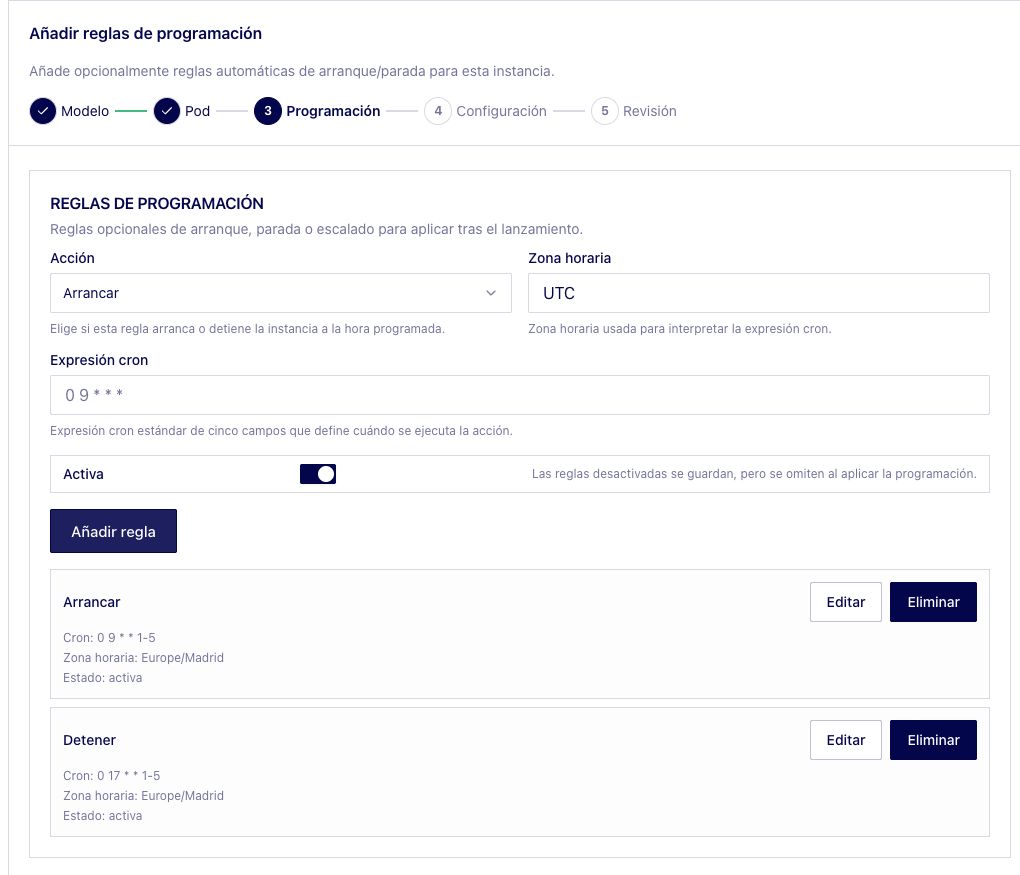
DeepSeek takes time to load, so an earlier start helps if you want it ready at nine. That time is billed too. Europe/Madrid follows daylight-saving changes, and the weekly rules also run on public holidays. Agents working after five will need longer running hours.
At the reference rate of €5/hour for the whole deployment, your compute bill depends on how long you leave it running.
The cost per person is divided among all the members sharing it. Adding members reduces each person's share, but the GPUs still have the same capacity. If more people work at once, you will need to consider a larger offer or add replicas.
For your budget, use the price of your chosen offer, include startup time in the billed hours and add storage and any other charges it lists. QDivZero's pricing options have the details.
Comparing with other tools means adding the license and chat and agent usage. This private QDivZero deployment charges compute by GPU hours. The capacity you rent determines how much work you can process in that time.
Copilot Business contributes 1,900 AI Credits per license each month to a shared pool. Chat and agents consume credits based on the model and input, output and cached tokens. Once the pool runs out, additional usage is charged if allowed. Code completions and next edit suggestions remain unlimited on paid plans.
On current Cursor Teams plans, the included pool covers its own models. When you select a third-party model directly, it is billed by tokens from the first request, with a Teams surcharge of USD 0.25 per million tokens. The calculator adds the additional spend you enter to the seat fee, after each service's included usage has been deducted.
What does a shared deployment cost?
Set your team size and active schedule. The hourly rate covers the whole DeepSeek deployment.
The reference is 32 concurrent users. Adding team members shares the bill more widely; it does not add GPU capacity. Context length and workload also affect concurrency.
Additional chat and agent usage
Enter the average monthly token spend billed on top of each license, per member, after included usage has been deducted. You can use the amount in your billing dashboard. Model, input, output and cached tokens affect the bill.
With additional usage at zero, Cursor and Copilot show base fees only. Included usage has limits.
The other curves add the license and token spend you entered. QDivZero shares the compute bill across the team.
- QDivZero
- Cursor Teams Premium
- GitHub Copilot Business
1 USD = 0.90 EUR. Illustrative example, not a live exchange rate.
Comparison assumptions
Edit the base seat prices and example conversion to match your offer.
| Provider | Base price assumption | Extra USD / member / month | Team / month | Member / month |
|---|---|---|---|---|
| QDivZeroDeepSeek 1017 compute | 5 EUR / deployment hour | Covered by compute | €880.00 | €13.75 |
| Cursor Teams PremiumBase fee only | $30 USD / seat / month | $0 | €1,728.00 | €27.00 |
| GitHub Copilot BusinessBase fee only | $19 USD / seat / month | $0 | €1,094.40 | €17.10 |
The QDivZero calculation covers compute. Include startup time in active hours; add storage and taxes separately. Additional usage depends on the chosen models, included credits and spending permissions. These services have different features and usage allowances.
Prices and billing rules checked . Cursor pricing source ($30 USD), GitHub pricing source ($19 USD). Token billing rules for Cursor · GitHub Copilot.
7. Start DeepSeek on demand with Serverless
With Serverless, a request can start the model and a period without traffic stops it. This is useful when the team's hours vary or some days see very little usage.
- Open your deployment's Configuration.
- Leave Replica set disabled and enable Serverless. This removes the instance's schedule rules.
- Set Idle time (seconds) to
900and save. This means 15 minutes without traffic. Setting it to0disables automatic stopping.
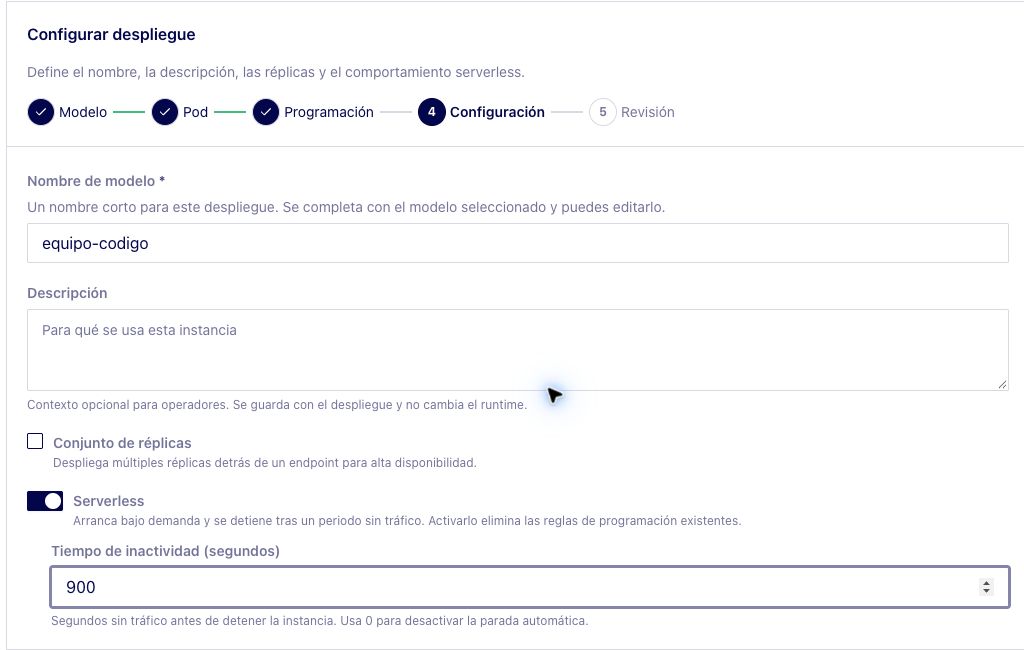
Once the instance is stopped, send the request from step 3. A direct request may wait during startup. The cURL example allows up to 900 seconds, which you can extend if the model needs longer to load.
OpenCode may spend some time running tests or tools without calling the model. If the GPUs stop during those gaps, increase the idle period.
With Serverless, the budget depends on the hours actually billed, including startup triggered by requests outside working hours. Each capacity search can return a different price. Maximum hourly price caps the offers you accept, while the monthly total depends on how long the GPUs run.
8. Add a Smart Balancer for DeepSeek if you need a fallback
A Smart Balancer routes requests across several DeepSeek V4.1 Flash 1017 deployments. The team keeps using the same model name even when you change the instances behind it. Start by creating a route to the instance you already have.
- Open Smart Balancers → Create Smart Balancer.
- Set the display name to
equipo-agentes, choose the Chat workload and Priority mode. Routes will follow the order you configure. - Under Routing, name the route
deepseek-1017, choose Instance and select your DeepSeek deployment. - Under Review, use
equipo-agentesas Model name and your instance as the destination. Save the balancer. - With the instance running, repeat the request from step 3 with
QDIV0_MODELset toequipo-agentes.
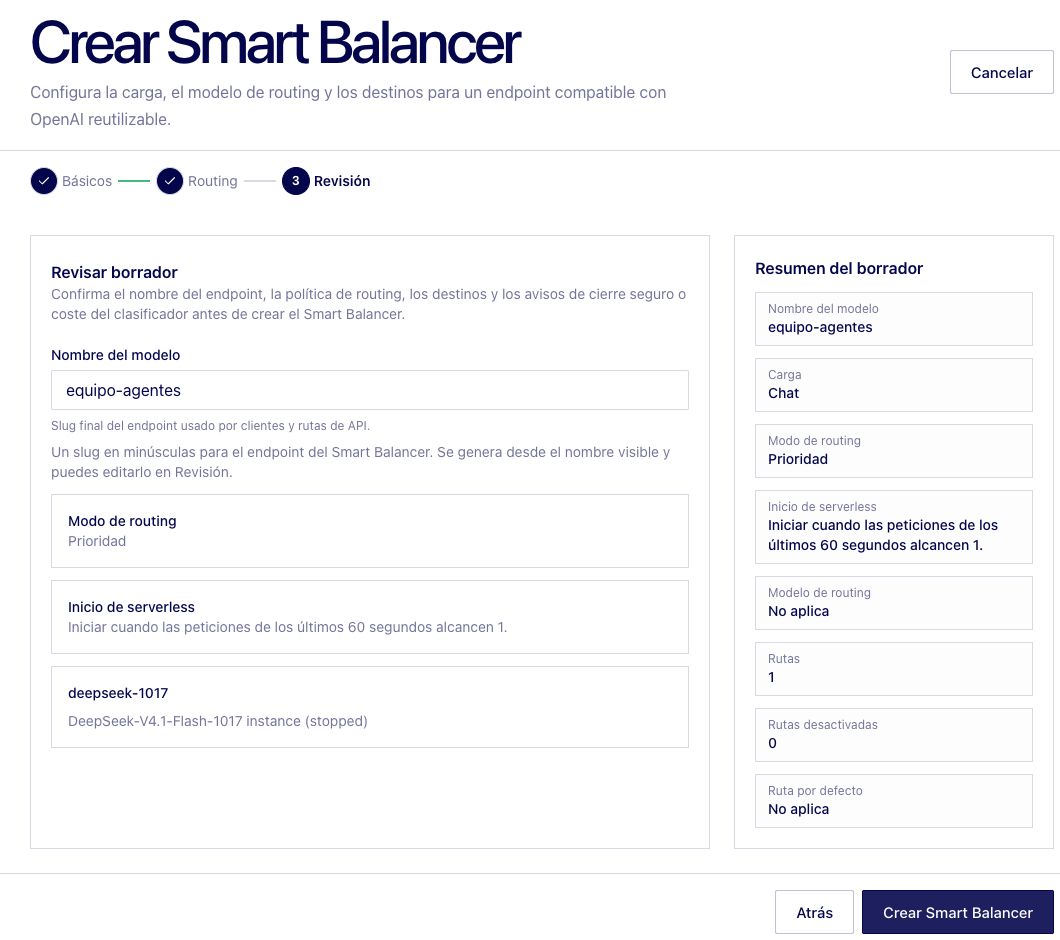
Once you receive a response, replace equipo-codigo with equipo-agentes in both the model field and the key inside models in opencode.json. The team can use that file with the same API keys and base URL.
To handle requests while a Serverless instance loads, add a second private instance of the same revision as the next route, also with the Europe filter. It needs to be available, and its cost adds to the budget. Setting Requests to start serverless to 1 with a Rolling window of 60 seconds requests startup on the first call. The fallback instance responds while it loads.
You can try the handover by stopping the primary instance and sending a request. You will see which destination handles it during startup. Once the primary is available, new requests return to the first route. Responses already being generated finish at the destination that received them. If one is interrupted, look at the actions the agent already ran before repeating the task.